Using social media to support online collaboration

Today I presented a session at Teresa MacKinnon’s seminar “Realities of social media in learning and teaching” part of the HE Academy’s Changing the Learning Landscape seminar series – more details at http://www.heacademy.ac.uk/events/detail/2014/24_April_SocialMedia_CLL

Most of my research at the moment is in online collaboration for design, but I wanted to support the seminar, so looked for an overlap between what I’m doing and social media. Online collaboration involves social media, but on reflection I realised the link is closer than that. Social media really forms the safety net for collaborative design.

The argument I was putting forward is that online collaboration can be as effective as offline collaboration as long as trust is maintained in the team. When trust diminishes (usually because one part of the team fails to fulfil allocated tasks) then the difference between online and offline collaborations becomes apparent. If you’re working in an offline team, then you can collar the weaker links in the corridor, or drag them off for lunch, and re-establish the sense of social commitment that underlies most effective collaborations. If you’re working online there are no real ways to do this.

However, research going back to the 1990s shows that trust is developed in online computer mediated communication by socialising, disclosure, joking around. By encouraging usage of social media, then the online teams would have a social recourse to re-establishing trust. However, the students we’ve worked with in online collaboration don’t actually socialise within the groups online. One of the reasons raised by the participants in the workshop was that maybe they don’t want to – which is true – if you’re falling out with someone over work, the last thing you want to do is swap funny cat pictures. However, doing this is (according to the literature) the way to re-establish rapport.

It might seem odd that digitally literate students (and they are) don’t use the communication platforms to socialise. They do create Facebook groups, but these are nearly always purely functional, they are just there to arrange meetings or discuss work. Partly this is because they felt the necessity to maintain a professional demeanour online, since their perception was that this is what you’re supposed to do. With more experience of the world of work, I think it becomes evident that being too professional is counter-productive – peers want to see an authentic online personality. I think another reason, and this was confirmed by the students in the room at the seminar, is that there is a generational difference between people of our generation and those who are younger, one that we see particularly in evidence in virtual worlds. For the middle-aged, we conduct a lot of our relationships online, we have jobs, families, employment patterns mean we’ve moved apart from our peer groups, and so we are comfortable with having online relationships that are solely online. For students who are usually of a younger generation, online relationships are almost exclusively extensions of their face-to-face ones. They usually don’t get to know people only online. They’re not seen as “real friends”. Encouraging students in online collaborations to form these social bonds online therefore can’t be left to chance – the process needs to be scaffolded with activities to facilitate the online socialising process.

There is a link to my presentation on slideshare following. At the moment it won’t let me in because it doesn’t seem to recognise the password that my browser has stored. So either Firefox has let me down on remembering the password, or Slideshare has screwed up my login details. Either way, this technology is not as easy to use as it should be. If I get the reset email (which hasn’t arrived yet, so either my email account is playing sillybuggers or Slideshare is way too slow at sending out my password reset link) then it will appear in my next post.
 

BIM Level 3 compliance

Still blogging about the BIM-Hub project from at the website http://bim-hub.lboro.ac.uk/ As we’re half way through the PI and I have started looking at follow-up projects and one of the grants going round at Loughborough at the moment is Enterprise funding. So we were looking at commercial exploitability of what we were doing. Throughout the project we’ve been looking at a range of things, one of these is how to set up collaborative projects between multiple universities, and what needs to be in place for the students to conduct them effectively. On top of that are the skills that the students need to collaborate. Breaking those down though we can see that some of these aren’t specific to online collaboration, they are generic skills for any type of collaboration, meeting deadlines, planning activities, that sort of stuff. However all of them need to be in place, and not all of them can be assumed to be amongst the skillsets of the students. Well in fact you shouldn’t assume any of them. For me though, the most fascinating are the skills that need to be acquired to make the online synchronous interactions work effectively. It ties into my work on presence a great deal, and has been called by one of my colleagues situational awareness. You can see in the recordings of early meetings, there is little in the way of an online situational awareness, and this really gets in the way of an effective collaboration.

Looking at commercial exploitability the PI on the project was talking about a new version of BIM that is being introduced. BIM is Building Information Modelling, which is a kind of transactional online space in which architects’ plans, building models etc are all shared, together with timelines, deadlines and so on (OK that’s a given if we’re talking about a transactional online space, but this is specifically for the Built Environment sector). Level 3 is introducing realtime collaborative manipulation of 3D models to facilitate online co-creation of digital artefacts. The technology will be in place, but experience indicates that the skillset in order to make this work effectively won’t be thought about until people start screwing up. It was the same with videoconferencing. The trainers and techies would come in, set up the link, explain which button to press, and leave people to it, assuming “well they know how to teach”. Thing was, the skills needed to teach in a videoconferencing environment are far different than a classroom. You have to emote more, you have to pay a lot more attention to backchannels, you have to take your own level of participation way down (because the cognitive load of watching a lecturer on the screen is way higher than following them in a lecture room) and you also need to give them stuff to do in classroom, to bring back to the videoconference, so they get a break from it. And you also need to find little tricks to create a stronger link between the two ends (matching physical artefacts, that sort of stuff). There’s other techniques too.

So teachers would come in, use the videoconferencing kit as they’d been shown, but with no training in the specific skills on *how to function in that environment. The session would be a disaster and they’d go back to travelling a day or two to do a two-hour lesson.

So, the dangers are that BE businesses are going to use Level 3 BIM, not realise there are a load of soft skills they need to apply to make the collaboration effective and deem the whole thing a failure. What we’ve realised we’ve done in the project is to dry run the whole Level 3 BIM thing with students in a working simulation, with similar software, and identify what the issues are in order to provide guidance for anyone using Level 3 BIM. There may be some more once it gets used in the commercial sector, but we have a strong evidence base for what needs to be done.

So … even if the bid for further funding isn’t successful – putting the bid together has been useful because it clarifies the value of what we’re doing on the current project. I’m a big fan of utilisation evaluation, you just find out the stuff you can use. On the project we’ve now got a really good idea of what we need to find out, and for whom. And … that it will have a real practical use.

Learning through online collaboration

Next Wednesday I’m running the first dissemination event from the BIM Hub project. It’s a webinar organised by ELESIC and is at 12:30 GMT and can be connected to at this link http://uni-of-nottingham.adobeconnect.com/elesig. BIM Hub is the project I’m working on at Loughborough University, the project website is at http://bim-hub.lboro.ac.uk/ .

It’s a good time to be starting the dissemination because we’re getting to the point of not only having got lots of good data, but have been able to carry out the analysis of some of it.

To give you the story so far, BIM Hub links together students from three universities; Loughborough and Coventry in the UK and Ryerson in Canada. It also links together students from a variety of disciplines, but overall these are architecture, construction engineering and project management. The idea is that the students are given the task of designing a building to fit into a particular piece of land around Coventry, they have to come up with three concepts for the client (their tutors) and then have to go ahead and design something for the concept that’s chosen. The project is funded by the HEA and is a continuation of a previous one funded by the Hewlett Packard Catalyst program.

We’re planning to capture lots of different data sets, focus groups with students, surveys that they fill in, and analysis of some of the recordings of their interactions in GoToMeeting (which is the videoconferencing tool they are using).

Some of the things that have come out so far corroborate what we’ve seen before. Trust seems to be the most important component of a successful interaction. Failure to fulfil obligations as far as passing on contributions by agreed deadlines seems to be the biggest factor in undermining trust, and as we saw before with the HP project, that’s where the distanced nature of the project comes into play; it seems to be far more difficult to rebuild trust in a distanced environment than it is in a face to face one.

There were advantages to working across institutions however. The students felt it was a more authentic simulation of an actual working activity. Since in the face-to-face situations they tend to work with friends, working inter-institutionally meant that they had to present a professional persona to people who they did not know, and represent their institution to others. However, quite a few (about half) complained that working across screens was not as engaging as f2f and claimed that in a working situation they would still meet others at least once.

Part of the problem with lack of engagement appeared to be (when watching the videos of the meetings) the very limited social presence that the students presented online. The meetings did not start off with any pleasantries, the students only saw each others video in brief glimpses when they were switching between windows. Interactions took place for long periods of time in audio only.

Image

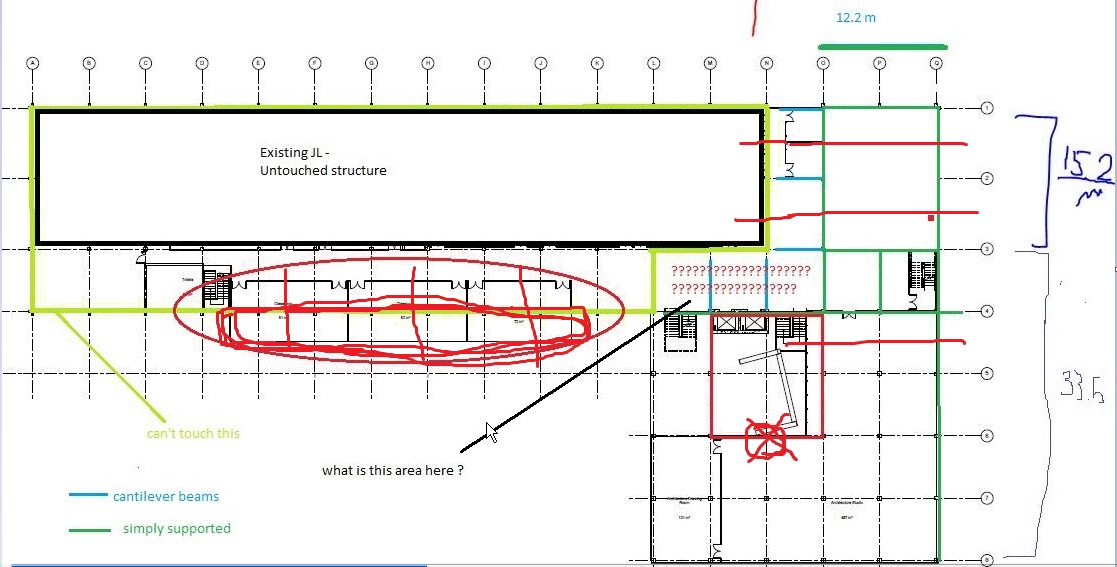
Where students did make their presence felt was in the way they interacting with the diagrams on the screen. As you can see in the image above, the students were drawing on the plans in real time, what you need the video to see is how the scribbling was used to emphasise, clarify and draw attention to, specific parts of the image that were the centre of discussion. This wasn’t a skill that the students started with, in other videos you can see them trying to describe stuff orally, then give up and use the images from plans, gradually learning to express themselves at a distance. In very early videos, the students mumble and aimlessly flick through paper plans – separated from each other in their own rooms, and failing to bridge the distance between them.

Other skills we see develop across the videos are basic elements of structuring meetings, using agendas, clarifying action points, timing the discussions. The focus groups confirm this: the students state that one of the most important things they learnt from the exercise was the importance of things such as minutes and agendas in ensuring meetings went smoothly – the generic collaboration skills are being discovered as much as the skills specific to online working.

What was impressive was the fluidity and competency with which the students moved between different technologies. Dropbox was used for organising and sharing documents, GoToMeeting for synchronous communication, emails for correspondence and Facebook for clarifying communications and organising meetings. It was only the one or two groups who crossed these demarcations (eg using FB to share documents ) that ran into confusion, although all had tech problems with the hardware needed to run GTM, and all had software incompatibility problems.

They also got over all the cultural/language problems. For example, every time a floor was mentioned it was accompanied by “first for us, second for you” and so on. All seemed to struggle with timezone issues, particularly in the week between UK clocks going back and Canadian clocks going back. North American candy companies have a lot to answer for.

The ease of use of the technology, the development of social presence, the application of project management and time management techniques all seem to develop in concert with each other. One of the hypotheses we’re exploring is that these things are interdependent; for effective collaboration online all of these factors need to be exhibited – and we won’t see competent project management techniques without a correlating development of online presence. The question then becomes; how much of these skills that the students learn can we pre-empt by just telling them this stuff at the start? Experience in staff development tells me that there’s no point telling people in advance, they don’t really listen until things go wrong. But maybe students would be more mature about paying attention than staff are.